Introduction
This is a beginner’s tutorial for those who have never used Codex.
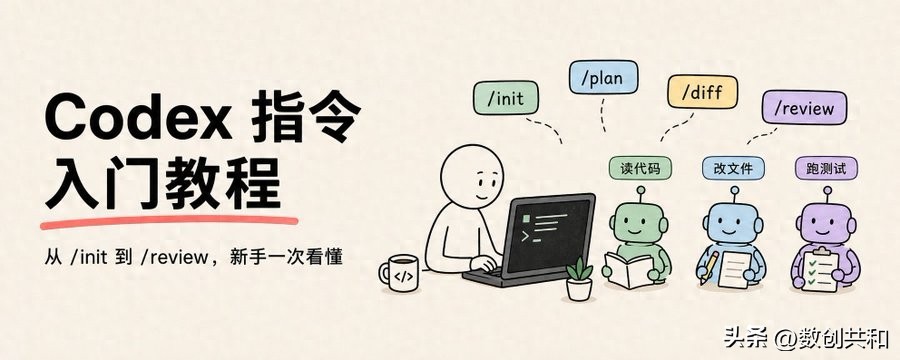
I will explain each command, what it does, when to use it, and provide a copyable example.
By the end, you will be ready to get started.
First, the conclusion:
Codex is not a chatbot.
It is more like an AI programming colleague sitting in your project directory.
You can make it read code, modify files, run commands, write tests, review changes, and more.
But you need to learn how to control it.
Otherwise, while it is smart, it can also be overly clever.
What are Codex Commands?
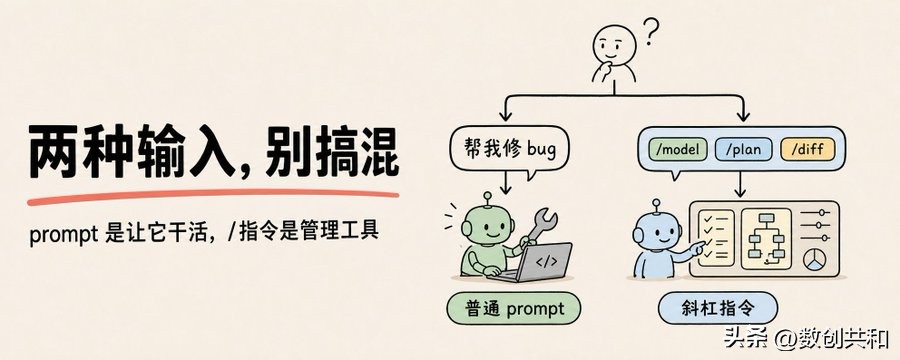
There are two types of inputs in Codex.
One is a regular prompt.
For example:
Help me see how to start this project.
Help me fix the login page bug.
Help me refactor this function to be clearer.
This is you asking Codex to do work.
The other type is slash commands, which start with a /.
For example:
/init
/model
/plan
/diff
/review
/compact
These are not requests for Codex to write code.
These are buttons to control how Codex works.
In short:
Regular prompt = What you want Codex to do
Slash command = How you manage Codex as a tool
Get this clear first, and things will be less confusing later.
Three Key Points to Remember
First, commands must be at the beginning.
/model is correct.
Please help me /model is incorrect.
Codex only recognizes a command if it sees / as the first character in the input box.
If you place /model in the middle of a sentence, it is just ordinary text.
Second, if you forget a command, just type /.
In Codex, typing / will bring up a list of available commands.
You can continue typing letters to filter.
For example, typing:
/mo
will show /model.
Note that the commands you see may differ for each user.
This is because your system, version, plugins, permissions, and experimental features may vary.
So the tutorial can only provide a map.
The list you see locally after typing / will always be the most accurate.
Third, don’t rigidly apply Claude Code concepts.
Many people come from Claude Code and can get confused.
Common terms in Claude Code like ‘CLAUDE.md’, ‘/btw’, and ‘/branch’ differ from Codex’s ‘AGENTS.md’, ‘/side’, and ‘/fork’.
Especially for project documentation.
Codex uses ‘AGENTS.md’.
You can think of it as an onboarding manual for Codex in the project.
When Codex enters a project, it will first read it to understand the project rules.
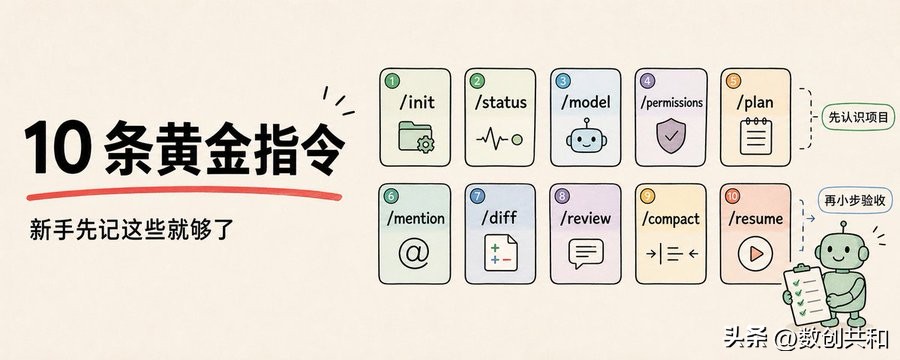
Ten Essential Commands for Beginners
Don’t try to memorize a bunch of commands right away.
Familiarize yourself with these 10 commands, and you can accomplish 90% of your daily development tasks.
1. /init
When Codex first enters a project, it knows nothing about your codebase.
It doesn’t know how to start the project, run tests, which directories are off-limits, or what agreements your team has.
In this case, type:
/init
It will generate an AGENTS.md file.
After it’s generated, it’s best to add a few sentences yourself.
For example:
This project uses pnpm.
The development command is pnpm dev.
The test command is pnpm test.
Do not modify the dist and generated directories.
All API requests go through src/lib/api.ts.
These sentences are very valuable.
You won’t have to re-educate Codex every time.
By writing the rules in, it will refer to them in the future.
2. /status
If you don’t know what model Codex is using, what permissions it has, which directory it’s in, or how much context it can use, just type:
/status
It will tell you the current model, permission policies, writable directories, and context situation.
When to use it?
When you are worried it might modify the wrong directory.
When you suspect the model hasn’t switched successfully.
When you don’t know if it’s in read-only mode.
When you feel the conversation is getting too long.
For beginners, the first instinct to troubleshoot is /status.
3. /model
Use a fast model for simple tasks.
Use a strong model for complex tasks.
Type:
/model
It will bring up a model selector.
When should you use the strong model?
- Large refactoring
- Complex bugs
- Analyzing unfamiliar codebases
- Cross-module migrations
- Architectural design
- Security-sensitive changes
When shouldn’t you?
- Changing copy
- Reviewing a small function
- Fixing simple type errors
- Explaining a piece of code
- Generating small scripts
In short:
Don’t spend money on small tasks, and don’t save money on big tasks.
4. /permissions
Codex doesn’t just talk.
It can actually modify your files.
So permissions are important.
Type:
/permissions
You can control whether it is read-only, can modify files, or must ask you before running commands.
Beginners are advised to be conservative.
At first, don’t let it run completely automatically.
Let it read the project, propose plans, and explain reasons.
Once you are familiar with its behavior, gradually loosen the controls.
Especially for production projects, legacy projects, or projects without Git, don’t let it run wild right away.
5. /plan
For large tasks, don’t let Codex jump straight in.
Have it think it through first.
For example, don’t say:
Help me refactor the permission system.
Instead, say:
/plan Help me analyze the current permission system and provide a low-risk refactoring plan without changing the code first.
This command is suitable for:
- Refactoring
- Migration
- Complex bugs
- Performance optimization
- Multi-file modifications
- Tasks with uncertain risks
Beginners should remember:
The larger the task, the more you should /plan first.
6. /mention
If you don’t want Codex to rummage through the entire project, just mention specific files.
For example:
/mention src/api/user.ts
Then ask:
Help me explain the request flow in this file.
This is suitable for scenarios like:
- Specifying error files
- Specifying components
- Specifying configuration files
- Making Codex focus on a specific file
- Avoiding it searching the whole project unnecessarily
Many beginners have issues where they ask Codex to read half the project for a small bug.
By providing it with the file, it saves time and effort.
7. /diff
After Codex modifies the code, don’t just look at its summary.
Make sure to check the actual changes.
Type:
/diff
To see what files were added, what content was deleted, and if there are any untracked files.
This command is very important.
If Codex says, “I only made a small change,” don’t take its word for it.
Check the diff.
AI summaries can miss details.
Diffs won’t.
8. /review
After Codex writes code, you can have it switch to a reviewer perspective and look over it again.
Type:
/review
It will focus on:
- Any bugs
- Any behavioral regressions
- Any missing tests
- Any overlooked edge cases
- Any security risks
It is recommended to run this before submitting.
A good combination is:
/diff
/review
First check the changes, then have it review.
9. /compact
If you have been chatting with Codex for a long time, the conversation will get longer.
Each of its responses will have to consider the previous history.
The longer the chat, the slower and more expensive it gets.
At this point, type:
/compact
It will compress the previous conversation into a summary and continue with the current task.
Note:
/compact does not clear the history.
It compresses it and continues the current topic.
If you want to completely change tasks, use /new or /clear.
10. /resume
If you asked Codex to fix a bug yesterday and it wasn’t finished, come back today and type:
Comments
Discussion is powered by Giscus (GitHub Discussions). Add
repo,repoID,category, andcategoryIDunder[params.comments.giscus]inhugo.tomlusing the values from the Giscus setup tool.